About Xkills

Learn the craft. Make the work.

Xkills helps creators grow their skills and turn ideas into finished work—with practical courses, ready-to-use creative packs, and tools built around the way people edit.

Practical learning for people who make things
A creative workflow, all in one place

Learn a skill. Put it to work.

We bring education and practical creative resources together, so what you learn can move straight into your next project.

01
Learn with purpose

Courses built around doing

Follow practical lessons in video editing, color grading, cinematography, visual storytelling, and more. Learn a technique, see how it works, and use it in your own projects.

Find a course
02
Start with a strong base

Creative packs you can make your own

Explore LUTs, presets, and other production-ready assets. Apply an effect to get moving, then adjust it to suit your footage, image, and creative direction.

Explore Packs
In development
More creativity, inside your editor

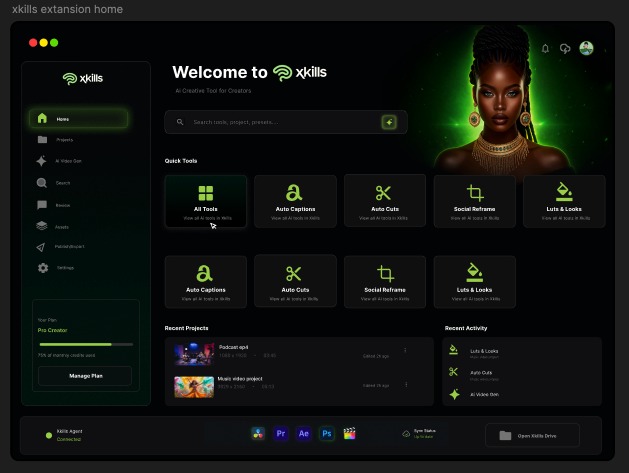
Xkills for Premiere Pro

We are developing a Premiere Pro extension to help editors shape prompts, create images and video, and work with reusable templates without leaving their editing flow.

See what we are building

The next chapter

A creative assistant, right inside Premiere Pro.

The Xkills Premiere Pro Extension is in development. It is being designed to help editors move from an idea or source asset to a preview they can bring into their active project.

  • Shape an ideaTurn a plain-language brief into a useful image or video prompt.
  • Create and previewGenerate image or video concepts, review the result, and refine it before use.
  • Adapt a templateUse reusable creative recipes with your own media, then bring approved results into the timeline.

Planned subscriptions will include generation credits, with usage tied to the creative jobs you run.

Xkills Premiere Pro extension home screen, with creative tools and recent projects
Xkills Premiere Pro ExtensionInterface preview · In development